
Free injection tracker for every shot
An injection tracker records each shot: what it was, the amount you entered, when you took it and where on your body it went. PeptideMate does this for peptides, GLP-1 medicines and any other injection you type in, with a front and back body map for the site, reminders and a full history. It is free to download for Android, iPhone, iPad and Mac, and there is a free web app.
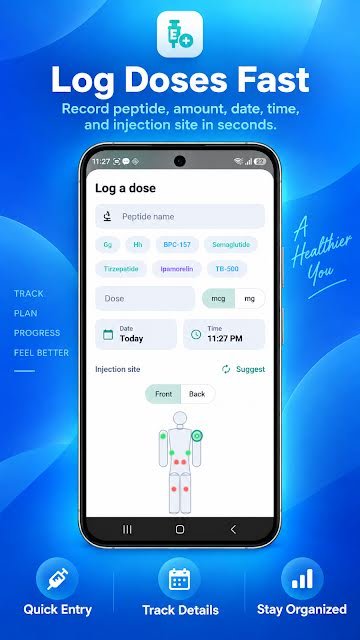
What does the injection tracker record?
- The name of what you injected, typed once and then picked from chips
- The amount, in mcg or mg, exactly as you enter it
- The date and time, filled in for you and editable
- The injection site, tapped on a front or back body map with left and right sides
- Notes and any side effects on the day
- Your vials in a separate inventory, with lot number, expiry date and amount left
How do you log a shot?
- Tap the centre button on the home screen.
- Pick the name, or type a new one, and enter the amount.
- Switch between the front and back map and tap the site you used.
- Add a note if you want one, and save. The site appears next to the entry in your history.
The injection site tracker page explains the body map in more detail.
How does the history help with site rotation?
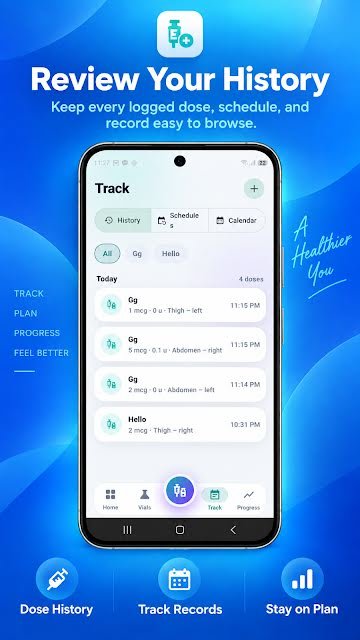
People who inject regularly are usually advised by their clinician to rotate sites, and remembering where the last few shots went is harder than it sounds, especially with more than one a week. In PeptideMate every entry carries its site, so the history reads like a rotation log: right abdomen on Monday, left thigh on Thursday, and so on.
A Suggest button proposes a site for the next entry based on your own record. It is a reminder of where you have been, not advice: follow the rotation pattern your healthcare professional gave you.
If you would rather start on paper, how to keep an injection site rotation log has a naming scheme and an example, and subcutaneous injection sites and rotation explains why clinicians advise it.
Which injections can you track?
Any. You type the name yourself, so the same tracker works for a daily peptide from a vial, a weekly GLP-1 shot such as semaglutide or tirzepatide under whatever name is on your pen, and other injections your prescriber has given you. You can log several, each entry with its own name, and filter the history to one at a time. For weekly GLP-1 shots there is a dedicated GLP-1 shot tracker page.
PeptideMate is not built for insulin decisions. If you use insulin, use the tools your diabetes team recommends.
Reminders and schedules
Create a schedule with the days and times you have been given, daily or once a week, and switch on reminders. The home screen shows what is due today, what is coming up, your streak and how much of the week you have completed. When a reminder arrives, log the shot and it is ticked off. Reminders are part of the phone app; the web app shows what is due when you open it.
Phone app or web app?
Use the phone app if you want reminders and to log at the moment of the shot. Use the web app if you want a bigger screen, a shared computer, or no install at all; it covers the dose log, vials, protocols, injection sites, progress check-ins and CSV export, with a free account.
Getting your history out
PeptideMate exports your dose history as a CSV file, which opens in Excel, Google Sheets or Numbers. Bring it to appointments, or keep your own copy. See CSV export, or start with the free tracker spreadsheet template if you prefer a sheet.
What PeptideMate does not do
It does not tell you what to inject, how much, or where. It records what you enter, so the person prescribing has a clear history to work from. See the medical disclaimer.
Comparing injection trackers?
We compare PeptideMate with Injectly, MEDS, MyTherapy, Shotsy and others in best injection tracker apps, using each app's store listing and saying where the others are ahead. There is also a one-to-one page for PeptideMate vs Injectly.
Injection tracker questions
What is an injection tracker app?
An injection tracker app keeps a record of each injection: what it was, how much you entered, the date and time, and where on your body it went. Most also send reminders and show your site history so a rotation is easy to follow.
Is PeptideMate's injection tracker free?
PeptideMate is free to download on Google Play and the App Store, where the App Store version lists optional in-app purchases. The web app, which includes the dose log and injection sites, is free to use in full.
Can I track injection sites on Android?
Yes. PeptideMate is on Google Play, and its body map, site history and reminders work the same as on iPhone.
Which injections can I log?
Any. You type the name yourself, so it works for peptides, GLP-1 medicines such as semaglutide or tirzepatide, and other injections your prescriber has given you.
Does PeptideMate tell me where to inject?
No. The Suggest button only proposes a site based on your own record. Follow the rotation pattern your healthcare professional gave you.
Does PeptideMate tell me how much to inject?
No. PeptideMate records the amount you enter and never suggests one. That decision belongs with your prescriber or pharmacist.
Start your injection log
PeptideMate is free to download for Android, iPhone, iPad and Mac. Add your first vial and log your first dose in under a minute.



For Android, iPhone, iPad and Mac.