
Peptide schedule and dose reminder app
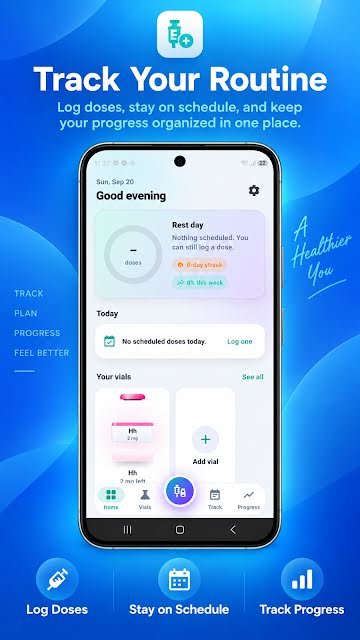
PepVault lets you create your own schedule and turn on reminders for it. The home screen shows what is scheduled today, what is coming up, your current streak and how much of the week you have completed.



For Android, iPhone, iPad and Mac. On the App Store the app is listed as PeptideMate.
What it records
- Schedules you create for each peptide
- Reminders for scheduled entries
- Today's scheduled doses on the home screen
- A day streak and a weekly completion percentage
- A calendar view of past and upcoming entries
How to use it
- Open the Track tab and choose Schedules.
- Create a schedule with the days and times you have been given.
- Turn on reminders in settings.
- When a reminder arrives, log the dose. It is ticked off on the home screen.
Why it helps
A schedule kept in your head or in a general calendar has no link to what you actually did. In PepVault the schedule and the log sit together: the home screen shows what is due, and logging the dose marks it done.
Days with nothing scheduled are shown as rest days, and you can still log an entry on one.
Questions about the schedules and dose reminders
Can PepVault remind me to take a dose?
Yes. Create a schedule and enable reminders, and PepVault notifies you when a scheduled entry is due.
Does PepVault create the schedule for me?
No. You enter your own schedule. PepVault does not suggest protocols, frequencies or doses.
Can I track a once-weekly injection?
Yes. Schedules are yours to define, so a once-weekly entry works the same way as a daily one.
More in PepVault
-
Peptide dose log
Record the peptide, amount, date, time, site and notes in a few taps.
-
Vial inventory and expiration tracking
Strength, lot number, cost, expiry, storage and how much is left in each vial.
-
Injection site tracker
Mark each site on a body map and see where earlier entries went.
-
Progress, measurements and side effects
Weight, body fat and waist over time, daily check-ins and a side effect record.
-
CSV export
Take your dose history with you as a spreadsheet-ready file.
Start your log today
PepVault is free to download for Android, iPhone, iPad and Mac. Add your first vial and log your first dose in under a minute.
For Android, iPhone, iPad and Mac. On the App Store the app is listed as PeptideMate.