
Peptide dose log app
PeptideMate's dose log records each dose with the peptide name, the amount in mcg or mg, the date and time, the injection site, personal notes and any side effects. Every entry is kept in a history you can filter by peptide and review at any time.



For Android, iPhone, iPad and Mac.
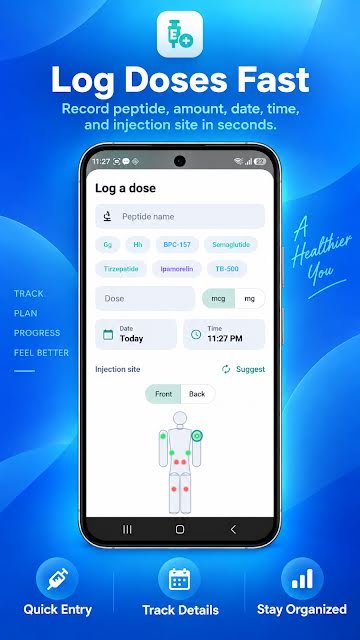
What does PeptideMate's peptide dose log record?
- Peptide name, with one-tap chips for the ones you log most
- Amount, in mcg or mg
- Date and time, defaulting to now
- Injection site, picked on a front and back body map
- Personal notes
- Side effects or other observations
How do you use it?
- Tap the centre button on the home screen to start a new entry.
- Pick the peptide, or type a new name.
- Enter the amount and choose mcg or mg.
- Tap the body map to mark the injection site, add a note if you want one, and save.
Why does it help?
A dose log only helps if it is complete, and it is only complete if logging is quick. The entry screen is a single form: the date and time are filled in for you, recent peptides appear as chips, and the site is one tap on a body map.
The history view lists every entry with its amount, syringe units, site and time, grouped by day. Filter chips narrow the list to one peptide, and separate tabs show your schedules and a calendar.
A peptide journal app, not only a dose log
Each entry has room for notes and side effects, and progress check-ins record weight, mood, energy, sleep and appetite on a 1 to 5 scale. Together they work as a peptide journal: what you took, where, and how you felt, in one dated history you can filter and export.
Prefer paper for the journal part? The free printable peptide log sheet has a dose log, a vial record and a weekly journal page with the same fields.
Questions about the peptide dose log
Can I log more than one peptide?
Yes. Each entry has its own peptide name, and the history can be filtered to show one peptide at a time.
Can I log a dose I forgot to record earlier?
Yes. The date and time default to now but both can be changed before you save, so a missed entry can be added afterwards.
Does PeptideMate tell me how much to take?
No. PeptideMate records what you enter. It does not recommend doses, protocols or treatment plans. Those decisions belong with a qualified healthcare professional.
More in PeptideMate
-
Vial inventory and expiration tracking
Strength, lot number, cost, expiry, storage and how much is left in each vial.
-
Schedules and dose reminders
Set your own schedule, get reminders and see what is due today.
-
Injection site tracker
Mark each site on a body map and see where earlier entries went.
-
Progress, measurements and side effects
Weight, body fat and waist over time, daily check-ins and a side effect record.
-
CSV export
Take your dose history with you as a spreadsheet-ready file.
Start your log today
PeptideMate is free to download for Android, iPhone, iPad and Mac. Add your first vial and log your first dose in under a minute.
For Android, iPhone, iPad and Mac.