
Free peptide tracker for your phone, Mac and browser
PeptideMate is a free peptide tracker for Android, iPhone, iPad, Mac and your browser. Log each dose in seconds, see how much is left in every vial, get reminded when the next one is due and keep a record of every injection site.
- Free to download
- Record keeping only, no dosing advice
- CSV export of your history
Open the full reconstitution calculator for the formula and a reference table.
What is a peptide tracker?
A peptide tracker is an app or log that records each peptide dose (name, amount, date, time and injection site) together with the vial it came from, your schedule and any side effects. It turns scattered notes into one history you can check and share with a healthcare professional. It keeps records only and does not suggest doses.
What is PeptideMate?
PeptideMate is a free peptide tracker app for Android, iPhone, iPad and Mac. It keeps a personal log of doses, vial inventory, injection sites, schedules and reminders, body measurements and side effects, and exports the history as a CSV file. A free online peptide tracker covers the same records in your browser. It is a record-keeping tool: it stores what you enter and does not recommend peptides, doses or protocols. Until October 2026 it was called PepVault on Google Play, and it is not the unrelated iPhone app of that name.
Inside the app
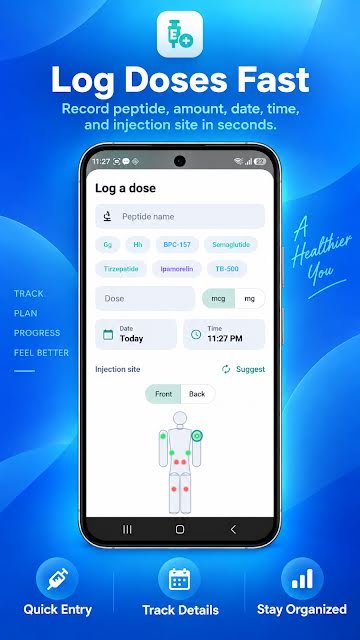
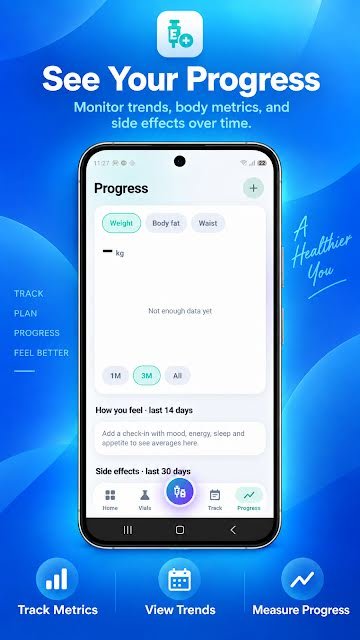
Real screens from PeptideMate on Android.



PeptideMate features
Six parts of the app, each built around one job.
-
Peptide dose log
Record the peptide, amount, date, time, site and notes in a few taps.
-
Vial inventory and expiration tracking
Strength, lot number, cost, expiry, storage and how much is left in each vial.
-
Schedules and dose reminders
Set your own schedule, get reminders and see what is due today.
-
Injection site tracker
Mark each site on a body map and see where earlier entries went.
-
Progress, measurements and side effects
Weight, body fat and waist over time, daily check-ins and a side effect record.
-
CSV export
Take your dose history with you as a spreadsheet-ready file.
How does PeptideMate work?
-
Add your vials
Enter the strength, lot number, expiration date and storage conditions from the label. Mark each vial sealed or reconstituted.
-
Set your schedule
Enter the schedule you have been given and switch on reminders. Today's entries appear on the home screen.
-
Log each dose
Pick the peptide, enter the amount, tap the site on the body map and save. It takes a few seconds.
-
Review and export
See your history, measurements and side effects over time, and export the dose history as a CSV file.
What can you track?
Any compound you log by name, because you type the name yourself. People use PeptideMate to keep records for prescription GLP-1 medicines such as semaglutide and tirzepatide, and for peptides such as BPC-157 and TB-500. PeptideMate records what you enter. It does not recommend any product, dose or schedule, and it says nothing about what a compound does.
- Doses: name, amount in mcg or mg, date, time, injection site, notes and side effects. Missed doses can be recorded too.
- Vials: strength, lot number, cost, sealed or reconstituted, expiry, storage and the amount left.
- Schedule: the plan you have been given, with reminders, a day streak and weekly completion.
- Body and wellbeing: weight, body fat and waist, and check-ins for mood, energy, sleep and appetite.
Taking a weekly GLP-1 shot? The GLP-1 shot tracker page shows how the same log fits a once-a-week injection.
What makes a good peptide tracker?
Whichever app or sheet you choose, check that it does these five things:
- Keeps the unit with every number, so mcg, mg, mL and syringe units are never mixed up
- Ties each dose to the vial it came from and shows how much is left before the expiry date
- Records the injection site, so you can see where you injected last time
- Logs missed doses as well as the ones you took
- Lets you export your full history, and delete it when you want to
The guide to choosing a peptide tracker app goes through each point.
Free, private, yours
Comparing options? Compare peptide tracker apps, read peptide tracker app vs spreadsheet, or start with the free peptide tracker spreadsheet template.
Phone app or web app: which should I use?
Both are free and keep the same kind of record. You can use the phone app day to day and the web app at a desk.
The app for Android, iPhone, iPad and Mac
- Reminders and notifications for scheduled doses
- A body map for picking and rotating injection sites
- Logging in a few taps, wherever you are
The web app in your browser
- Nothing to install: works on a computer, tablet or phone
- Dose log, vial inventory, protocols, injection sites and check-ins
- CSV download of everything, with a free account
Free peptide calculators
They run in your browser, need no sign-up and show the formula they use.
- Peptide reconstitution calculatorVial strength, water added and dose in; concentration and syringe units out.
- mcg to mL and units converterSwitch between mcg, mg, mL and syringe units at any concentration.
- Vial duration calculatorDoses per vial, weeks of supply, run-out date and cost per dose.
- Bacteriostatic water calculatorHow much water makes your dose land on a round number of units.
- Peptide half-life calculatorHalf-life and time elapsed in; percentage remaining out.
- Tirzepatide calculatorTurn a tirzepatide dose in mg into units, using the concentration on your vial.
- Semaglutide calculatorTurn a semaglutide dose in mg into units, using the concentration on your vial.
- Units to mg calculatorHow many mg (and mcg) a number of syringe units holds.
- Syringe units to mL converterUnits to mL and back on a U-100 syringe, with a chart.
- Split dose calculatorEach injection in mg and units when a weekly amount is split.
- Vial switch calculatorThe same dose in units when the new vial is stronger or weaker.
- GLP-1 protein calculatorBody weight × g/kg = grams of protein a day, and per meal.
- GLP-1 cost calculatorPrice of a pen, vial or box in; cost per dose, month and year out.
Guides to better records
Plain explanations of the maths and the habits behind a useful log.
- How to choose a peptide tracker app: a 10-point checklist3 minute read
- How to keep a peptide dose log3 minute read
- Peptide reconstitution math, explained with examples3 minute read
- How to log a compounded GLP-1 vial7 minute read
- 0.3 mL, 0.5 mL and 1 mL syringes: how to read the units3 minute read
- Subcutaneous injection sites, rotation and lipohypertrophy3 minute read
- How to keep an injection site rotation log2 minute read
- How to track peptide vials, lot numbers and expiry dates3 minute read
- Peptide storage: refrigeration, shelf life and travel4 minute read
Questions people ask
What is PeptideMate?
PeptideMate is a peptide tracker app for Android, iPhone, iPad and Mac. It keeps a personal record of your doses, vial inventory, injection sites, schedules and reminders, body measurements and side effects in one place, and can export your dose history as a CSV file.
Is PeptideMate free?
PeptideMate is free to download from Google Play and the App Store. Both store listings show optional in-app purchases, and the web app is free to use in full.
What is the best app to track peptides?
A good peptide tracker should log doses quickly, keep a vial inventory with expiration dates, record injection sites, send reminders and let you export your data. PeptideMate does all of these: dose log, vial inventory with lot numbers and expiry, body-map site tracking, schedules with reminders, progress charts and CSV export.
What can I track in PeptideMate?
Doses (peptide name, amount, date, time, injection site, notes and side effects), vials (strength, lot number, cost, sealed or reconstituted status, expiration date, storage conditions and remaining supply), schedules and reminders, body measurements (weight, body fat and waist) and check-ins for mood, energy, sleep and appetite.
How do I calculate how many units to draw?
Divide the vial strength by the liquid added to get the concentration, divide your dose by that concentration to get the volume, then multiply by 100 for units on a U-100 syringe. Example: a 5 mg vial with 2 mL added is 2.5 mg/mL; a 250 mcg dose is 0.1 mL, which is 10 units. The free PeptideMate reconstitution calculator on this site does the arithmetic for you.
Does PeptideMate give medical or dosing advice?
No. PeptideMate is for personal record keeping and organisation only. It does not diagnose, treat, cure or prevent any condition, and it does not prescribe peptides or recommend doses, protocols or treatment plans. Always consult a qualified healthcare professional before starting, stopping or changing anything.
Featured on
-

-

 FEATURED ONShapelessAI
-

-

-

-
-
-

-

-
-

-

-

-
-

-

-

-

-
-

-
-

-

-

-

-

-

-

-

-

-

-

-
-

-

-
-
-

-

-

-

-

-
-

-

-

-
-

-

-
-

-
-

- Featured on Bunny Directory
-

-

-
- PeptideMate on Launchtory
-

-

-

-

-

-

-

-

-

-

-

-

-

- Featured on Microlaunch
-

-

-

-

-

-

-

- Featured on StartupDirectory
-

-
-

-

-

-

-

-

-

-

-

-

-
-

-

-

-

-

-

-

-

-

-

-

- Featured on AIxploria
- Featured on Insidr.ai
-

-

-

-

-

-

-

-

-

-

-

-
-

-

-

-

-

-

-

-

-

-

-

-

-

-

-

-

-

- Featured on AppShopper
-

- Based Tools AI
- Featured on Startups.fyi
- Featured on StartupTabs
- PeptideMate on Startup Tracker
- Featured on LaunchDir
- Featured on AllTopStartups
- Featured on There's An AI For That
- Featured on Dang.ai
- Featured on AI Tools FYI
- PeptideMate on AppAgg (Android)
- PeptideMate on AppAgg (iOS)
- PeptideMate on SensorTower (iOS)
- PeptideMate on AppMagic (iOS)
- PeptideMate on 148Apps
- Featured on SaaSCity
- Featured on Twelve Tools
- PeptideMate on Crozdesk
- Featured on Directree
- Domain Rating on RacoonDR
- Featured on SaaSBison
- Featured on DodoDirectory
- Featured on Sourceforge
- Featured on TechCrunch
- Featured on AI Tools by Neil Patel
- Featured on G2
- Featured on Hacker News
- Featured on Capterra
- Featured on DEV Community
- Featured on Launched by Lovable
- Featured on AngelList
- Featured on Indie Hackers
- Featured on ScamAdviser
- Featured on StackShare
- Featured on AlternativeTo
- Featured on Brownbook
- Featured on Active Search Results
- Featured on Turbo0
- Featured on Webwiki
- Featured on Theres An AI For That
- Featured on Callupcontact
- Featured on Toolpilot
- Featured on Webrazzi
- Featured on Peerlist
- Featured on BetaList
- Featured on Alternative.me
- Featured on ExactSeek.com
- Featured on SoftwareWorld
- Featured on SubmitAiTools
- Featured on Toolify.ai
- Featured on magicbox.tools
- Featured on HotVsNot.Com
- Featured on PeerPush
- Featured on SiteLike
- Featured on Futurepedia
- Featured on AiTools
- Featured on aiwith.me
- Featured on Viesearch
- Featured on Addon Biz
- Featured on Sprout24
- Featured on Submission Web Directory
- Featured on Aura++
- Featured on High Rank Directory
- Featured on AgentHunter
- Featured on Indie Deals
- Featured on Sites Directory
- Featured on acidtools.com
- Featured on Firsto
- Featured on Super Launch
- Featured on Directory Web Promotion
- Featured on IdeaKiln
- Featured on NextGen Tools
- Featured on Site Promotion Directory
- Featured on Startups Lab
- Featured on Weboworld
- Featured on DealMirror
- Featured on TrustMRR
- Featured on Bens Bites
- Featured on TinyLaunch
- Featured on FoundrList
- Featured on Open Alternative
- Featured on 10015 Tools
- Featured on AI Tech Viral
- Featured on MakerThrive
- Featured on Openhunts
- Featured on Tiny Startups
- Featured on Unite List
- Featured on AppaList
- Featured on BAI.tools
- Featured on SaasHunt
- Featured on Promote Project
- Featured on AI Library
- Featured on Huzzler
- Featured on SoloPush
- Featured on A1 Bookmarks
- Featured on Navs Site
- Featured on Toolfio
- Featured on ProductBurst
- Featured on We Like Tools
- Featured on AI Agents Directory
- Featured on AI Startups
- Featured on T5
- Featured on SaaSpo
- Featured on Awesome Tools
- Featured on Micro SaaS Examples
- Featured on Victrays
- Featured on BestofAI
- Featured on IndieHub
- Featured on StartupBase
- Featured on Bulletin
- Featured on CTRL ALT
- Featured on SaaSBaba
- Featured on Startup Buffer
- Featured on The Rundown
- Featured on AI Tools Marketer
- Featured on RankYourAI
- Featured on Saaspa.ge
- Featured on AI Findy
- Featured on Best of Web
- Featured on HuntScreens.com
- Featured on IndieHackerStacks
- Featured on ShipYard HQ
- Featured on rankinpublic.xyz
- Featured on toolfolio
- Featured on Proofstories
- Featured on Startuplister
- Featured on EuroAlternative
- Featured on Spiff.store
- Featured on Startups.fm
- Featured on Directory-Free
- Featured on LLM Relevance
- Featured on Once.tools
- Featured on ToolHub
- Featured on FindYourSaaS
- Featured on AI Listing
- Featured on AI Tool Details
- Featured on ConfettiSaaS
- Featured on OpenFuture
- Featured on PromptZone
- Featured on Resource.fyi
- Featured on WhatTheAI
- Featured on AI Navbar
- Featured on AI TOOL GURU
- Featured on Ant Directory
- Featured on Daily Pings
- Featured on SubmitHunt
- Featured on Text Link Directory
- Featured on AffordHunt
- Featured on FiveTaco
- Featured on HUNT0
- Featured on ItsLaunched
- Featured on Made with Lovable
- Featured on NoteableAI
- Featured on OneMillionDirectory
- Featured on Stellar Launch
- Featured on AI Tools List
- Featured on AIxuanfeng
- Featured on BuildVoyage
- Featured on Justgotfound
- Featured on ailib.ru
- Featured on AwesomeIndie
- Featured on NavFolders
- Featured on One Million Screenshots
- Featured on Saassy Board
- Featured on SideProjects
- Featured on ai.dreamthere.cn
- Featured on hot100
- Featured on ANYFP
- Featured on See What New AI
- Featured on ToolScout AI
- Featured on stashli.st
- Featured on Kyi AI Directory
- Featured on Tip Season
- Featured on Top10
- Featured on 600.tools
- Featured on AI Depot
- Featured on WhatIsAITools
- Featured on Expify
- Featured on Lachief.io
- Featured on MarketingDB
- Featured on madewithbolt
- Featured on FeaturedTool
- Featured on NewAIForYou
- Featured on ProjectHunt.me
- Featured on Toollist
- Featured on Dirs.cc
- Featured on ScoutForge
- Featured on Launch Vibe
- Featured on startuups
- Featured on Versily
- Featured on launch.cab
- Featured on 10 Words
- Featured on 360Quadrants
- Featured on 9 Sites
- Featured on AI Repo
- Featured on AIx Collection
- Featured on ARS Technica
- Featured on Addictive Tips
- Featured on Agni
- Featured on AiTool.ai
- Featured on Airtable Marketplace
- Featured on Akita SaaS Directory
- Featured on All Startups Info
- Featured on All That SaaS
- Featured on All Top
- Featured on Alpha Digits
- Featured on Alternatives.co
- Featured on American Inno
- Featured on American Startups
- Featured on Amfibi
- Featured on Android Apps Review
- Featured on Android Authority
- Featured on App Listo
- Featured on App Review Central
- Featured on App Spy
- Featured on App Sumo
- Featured on AppExchange
- Featured on Apple Insider
- Featured on Appoid
- Featured on Appolicious
- Featured on Apps 400
- Featured on Apps Mamma
- Featured on Apps Mirror
- Featured on Apps Thunder
- Featured on Apps Zoom
- Featured on Appsolite
- Featured on Appvita
- Featured on Appy Smarts
- Featured on Artic Startups
- Featured on Ask Your Android
- Featured on Astro Growth
- Featured on Being Guru
- Featured on Best App for Kids
- Featured on Beta Bound
- Featured on BetaPage
- Featured on Betakit
- Featured on Better Buys
- Featured on Big Startups
- Featured on Bloombuzz
- Featured on Boing Boing
- Featured on Bootstrappers
- Featured on Breakout List
- Featured on BufferApps
- Featured on Built In
- Featured on Business Insider
- Featured on Business Software
- Featured on Business to Community
- Featured on Buzzfeed News
- Featured on CNET
- Featured on Cabinet
- Featured on Change Log
- Featured on Cipinet
- Featured on Cloudwards
- Featured on Clutch
- Featured on CoFounders Lab
- Featured on Coin Scribble
- Featured on Coindoo
- Featured on Collaborizm
- Featured on Compare Software
- Featured on Coop Commerce
- Featured on Crazy About Startups
- Featured on Creator Supply
- Featured on Crowd Reviews
- Featured on Cuspera e27
- Featured on Designer News
- Featured on Dev Pages
- Featured on Dev Post
- Featured on Dev Resources
- Featured on Digg
- Featured on Digital Trends
- Featured on Discover CRM
- Featured on Discover Cloud
- Featured on Discover Our Town
- Featured on EBool
- Featured on EU-Startups
- Featured on Efficient App
- Featured on Elpha
- Featured on Emoji Launch
- Featured on EnGadget
- Featured on F6S
- Featured on Fark
- Featured on Fast Company
- Featured on Featured Customers
- Featured on Feed My Startup
- Featured on Feedough
- Featured on Find Cool Tools
- Featured on Find SEO Tools
- Featured on FindStack
- Featured on Finding Startups
- Featured on Fintech News iLounge
- Featured on First 100 Users
- Featured on Freeble
- Featured on Fuel Up
- Featured on Future of Saas
- Featured on G2 Stack
- Featured on Geek Wire
- Featured on Geekopedia
- Featured on Get App
- Featured on Get Worm
- Featured on GetApp
- Featured on Growing Page
- Featured on Growjo
- Featured on Growth Hack List
- Featured on Growth Hackers
- Featured on Growth Junkie
- Featured on Growth Kit
- Featured on Gust
- Featured on Hackernoon
- Featured on Hackerspad
- Featured on Hopps
- Featured on How Brands Are Built
- Featured on How to buy SaaS
- Featured on IT Central Station
- Featured on ITQlick
- Featured on Inbox World
- Featured on Inc42
- Featured on Index
- Featured on India Mart
- Featured on Indian Yellow Pages
- Featured on Indie Gamer Reviewer
- Featured on Indie Hustles
- Featured on IndieStack
- Featured on IndieTool
- Featured on Info World
- Featured on InnMind
- Featured on Insanely Cool Tools
- Featured on Insanely Useful Websites
- Featured on Inside
- Featured on Insur-Tech iPhone Life
- Featured on Integrately
- Featured on Joinly
- Featured on Jona
- Featured on Karo Startup
- Featured on KitDB
- Featured on Kotaku
- Featured on Land-Book
- Featured on Landing Folio
- Featured on Latka
- Featured on Launched!
- Featured on Lets Venture
- Featured on Letter List
- Featured on Life Hack
- Featured on Listly
- Featured on Lobsters
- Featured on Local
- Featured on Lunadio
- Featured on MacTrast
- Featured on Magnitt
- Featured on Make Use Of
- Featured on Maker Lead
- Featured on MakerMove
- Featured on Makerlog
- Featured on Makerpad
- Featured on Mashable
- Featured on Merchant Circle
- Featured on Merchant Maverick
- Featured on MicroAcquire
- Featured on MicroStartups
- Featured on ModDB
- Featured on Morning Brew
- Featured on Mr. Free Tools
- Featured on My Startup Tool
- Featured on Neede
- Featured on Netted
- Featured on New Startups
- Featured on Next Big Product
- Featured on Next Big What
- Featured on No Code Founders
- Featured on NoCode Tech
- Featured on NoCodeDevs
- Featured on Online Genuises
- Featured on Open Startup
- Featured on Open Startup List
- Featured on Owwly
- Featured on Oye Startups
- Featured on PC Mag
- Featured on Paggu
- Featured on Pando
- Featured on Pipedrive Marketplace
- Featured on PitchBook
- Featured on Pocket Lint
- Featured on Pocket gamer
- Featured on Post Make
- Featured on Prefundia
- Featured on Press Hunt
- Featured on Press Notify
- Featured on PressFarm
- Featured on Productivity Directory
- Featured on Profit Hunt
- Featured on Programmable Web
- Featured on Project Hatch
- Featured on Promote Project
- Featured on Promotehour
- Featured on Public APIs
- Featured on RapidAPI
- Featured on ReadWrite
- Featured on Ready SaaS Go
- Featured on Red Ferret
- Featured on Remote Tools
- Featured on Robingood
- Featured on Romanian Startups
- Featured on SaaS Alliance
- Featured on SaaS Community
- Featured on SaaS Directory
- Featured on SaaS Genius
- Featured on SaaS Insider
- Featured on SaaS Mag
- Featured on SaaS Place
- Featured on SaaS Projects
- Featured on SaaSList
- Featured on SaaSRefs
- Featured on SaaSified
- Featured on SelectHub
- Featured on Shopify App Store
- Featured on Sick Tools
- Featured on Side Bar
- Featured on Silicon Angle
- Featured on Similar Site Search
- Featured on Site Jabber
- Featured on Slant
- Featured on Slash Dot
- Featured on Slate
- Featured on Small Business Marketing Tools
- Featured on Smart Money Match
- Featured on Snapmunk
- Featured on Software Advice
- Featured on SoftwareSupp
- Featured on Space Bandits
- Featured on Spectacle
- Featured on Spiceworks
- Featured on Spoke
- Featured on SpotSaaS
- Featured on SpringWise
- Featured on SpsFeed
- Featured on StackList
- Featured on Start Us
- Featured on Starter Story
- Featured on Starticorn
- Featured on Startup Beat
- Featured on Startup Button
- Featured on Startup Collections
- Featured on Startup Costs
- Featured on Startup Deals
- Featured on Startup Dope
- Featured on Startup Europe
- Featured on Startup Explore
- Featured on Startup Founders
- Featured on Startup Galaxy
- Featured on Startup Guys
- Featured on Startup Inspire
- Featured on Startup John
- Featured on Startup Lift
- Featured on Startup Pitch
- Featured on Startup Ranking
- Featured on Startup Resources
- Featured on Startup Roulette
- Featured on Startup Savant
- Featured on Startup Sea
- Featured on Startup Wizz
- Featured on Startup Wonders
- Featured on Startup World
- Featured on Startup benchmarks
- Featured on Startup-List
- Featured on Startup88
- Featured on StartupStage
- Featured on StartupTile
- Featured on StartupValley News
- Featured on Startups UK
- Featured on Startups Watch
- Featured on Startups of London
- Featured on State of Tech
- Featured on Storyfied
- Featured on Stripe App Marketplace
- Featured on Submissions Web Directory
- Featured on Submit Juice
- Featured on SuitApp
- Featured on Superbcrew
- Featured on Surges
- Featured on Taalk
- Featured on TapScape
- Featured on TeachOnline
- Featured on Tech
- Featured on Tech Co.
- Featured on Tech Directory
- Featured on Tech Dirt
- Featured on Tech Faster
- Featured on Tech Hive
- Featured on Tech In Asia
- Featured on Tech Pluto
- Featured on TechBehemoths
- Featured on TechBoard
- Featured on Techendo
- Featured on Techli
- Featured on TechnologyAdvice
- Featured on That App Show
- Featured on The AI Warehouse
- Featured on The Apple Google
- Featured on The Fascination
- Featured on The Hive Index
- Featured on The Indianpreneur
- Featured on The Next Web
- Featured on The Popular Apps
- Featured on The Startup Inc
- Featured on The Startup Journal
- Featured on The Startup Videos
- Featured on The Tech Blog
- Featured on The Tech Index
- Featured on The Tech Map
- Featured on The Verge
- Featured on The iPhone App Review
- Featured on TheNoCodeCrew
- Featured on Thing Testing
- Featured on Tool Finder
- Featured on Tool Salad
- Featured on Tools
- Featured on Tools NoCode
- Featured on Tools for Makers
- Featured on Toools.design
- Featured on Top No Code Tools
- Featured on Topion Networls
- Featured on Toshilist
- Featured on ToucheArcade
- Featured on Tran
- Featured on Trendy Startups
- Featured on Trust Pilot
- Featured on Trust Radius
- Featured on Unboxing Startups
- Featured on Under 1000 MRR
- Featured on Unita
- Featured on Up Labs
- Featured on Valuer
- Featured on Vator News
- Featured on Venture Beat
- Featured on VentureRadar
- Featured on Viral Indian Diary
- Featured on Virtual Mojito
- Featured on W3 Catalog
- Featured on Web App Rater
- Featured on Web Designer News
- Featured on Web Tools Weekly
- Featured on Web3 Canvas
- Featured on Webdesign Inspiration
- Featured on Webwide
- Featured on Whats new on the net
- Featured on Women Entrepreneurs Portal
- Featured on YC Startup School
- Featured on Yelp
- Featured on Young Upstarts
- Featured on Younoodle
- Featured on Your Stack
- Featured on YourStory
- Featured on ZDNet
- Featured on Zumvu
- Featured on e27
- Featured on AppLensy
- Featured on EarlyHunt
- Featured on FalcoScan
- Featured on JustLaunched
- Featured on StarTap
- Featured on Public Prompts
- Featured on Top AI Directories
- Featured on Altern AI
- Featured on AI Directory
- Featured on AI Corner
- Featured on AiDirs
- Featured on AI For Developers
- Featured on AIMiracle MAG
- Featured on ainave
- Featured on AI Agent Store
- Featured on AI Agents Live
- Featured on AI Agents Marketplace
- Featured on AI Hubs
- Featured on AI Hunt List
- Featured on AI Library
- Featured on AiMatchPro
- Featured on AI PEDIA HUB
- Featured on AI Pulse
- Featured on AI Resource Pro
- Featured on AI Respo
- Featured on AI Scout
- Featured on Aeotools
- Featured on AI Sites Net
- Featured on AI Tools Arena
- Featured on AI Tools Corner
- Featured on AI Tools Directory
- Featured on AI Tools Pin
- Featured on AISuperSmart
- Featured on AI-Tools Directory
- Featured on AI Tools Love
- Featured on AI Tools Magazine
- Featured on ALL AI TOOLS .TECH DIRECTORY
- Featured on All Things AI
- Featured on AI Tool Trek
- Featured on All The AI Tools
- Featured on AI Tools Explore
- Featured on AI Tools For Me
- Featured on AI Tool List
- Featured on AiToolz
- Featured on AI Toolz Dir
- Featured on AI Parabellum
- Featured on AI Agents Base
- Featured on AI Agents List
- Featured on AI Agents Listing
- Featured on AI Agents Verse
- Featured on Add AI Directory
- Featured on agentskill.sh
- Featured on AgentsIndex
- Featured on Aixyz
- Featured on AI Tools Saver
- Featured on AIChief
- Featured on Ask AI For It
- Featured on AI Headshot Hub
- Featured on AI Hustle
- Featured on AIToolsHunt
- Featured on Best of AI
- Featured on Best AI Tools org
- Featured on Beyond AI Tools
- Featured on Byblos AI
- Featured on ChooseTheAI
- Featured on ClaudePro.directory
- Featured on Cloudbooklet AI
- Featured on CogList AI
- Featured on ChatDevelopers.com
- Featured on DataLook.io
- Featured on Dynamite AI
- Featured on Dessign
- Featured on Desifounder
- Featured on Direct2App
- Featured on EveryDev.ai
- Featured on Evolmagazine.com
- Featured on Find An AI Tools
- Featured on Findyouragent.ai
- Featured on Find my AI Tool
- Featured on Foundr
- Featured on Free AI Tool
- Featured on Future AI Guide
- Featured on Futurepedia Wiki
- Featured on flowtools
- Featured on FastLaunch
- Featured on Grabon AI Directory
- Featured on God of Prompt
- Featured on Havnai
- Featured on HeyAIworld
- Featured on IA sur mesure
- Featured on Intelligent Tools
- Featured on Kick Product
- Featured on LineZine AI Tool Directory
- Featured on ListYourTool
- Featured on Makerlist.io
- Featured on Marketing Tools List
- Featured on Most Popular AI Tools
- Featured on Makerhunt
- Featured on NavTools AI
- Featured on NeonRev
- Featured on Nick Launches
- Featured on Not Human Search
- Featured on OpenSaasDirectory
- Featured on OpenTools
- Featured on Orbic AI
- Featured on PoweredbyAI
- Featured on Startuplist.in
- Featured on Stratup.ai
- Featured on Startup Tools List
- Featured on Sales Tools AI
- Featured on Stackviv
- Featured on SearchAiDirectory
- Featured on See AI First
- Featured on Selljam.ai
- Featured on Show Me Best AI
- Featured on Sidehunt
- Featured on Theres An AI
- Featured on theaisurf
- Featured on THANK JOHN
- Featured on ToolFinder
- Featured on Toolwave.io
- Featured on TopAI.tools
- Featured on ToolPasta by Robopost
- Featured on Top Tools
- Featured on Tools Hub AI
- Featured on ThatsMyAI
- Featured on The Next AI Tool
- Featured on TrustList
- Featured on TrustedBy
- Featured on Toolkitly
- Featured on ToolDirs
- Featured on Webspot
- Featured on WhatstheBigData.com
- Featured on Yet Another AI Tool Directory
- Featured on ZPlatform.ai
- Featured on kiintegration
- Featured on Backlinkhubs
- Featured on GoPickHost
- Featured on Doforai
- Featured on Aidreamhub
- Featured on 100 AI Apps
- Featured on 1payment Tools
- Featured on AI Center
- Featured on AI Directory
- Featured on AI Dude Info
- Featured on Submit
- Featured on AI Hunter
- Featured on AI Marketing
- Featured on AI Search
- Featured on AI To Grow
- Featured on AI Tool Board
- Featured on AI tool hunt
- Featured on AI Tool NET
- Featured on AI Tools Guide
- Featured on AI Tools Up
- Featured on AI Tools Wiki
- Featured on AI trendz
- Featured on AI Valley
- Featured on AlterOpen
- Featured on Appscriber
- Featured on Best AI To
- Featured on Best AI Tools
- Featured on BroUseAI
- Featured on ChatGPT demo
- Featured on Submit
- Featured on Digi Pro Tools
- Featured on Dokey AI
- Featured on DoMore
- Featured on Easy Save AI
- Featured on Easy with AI
- Featured on Educator Tools
- Featured on Submit
- Featured on Faind AI
- Featured on Favird
- Featured on Flip Bytes
- Featured on Free AI Apps
- Featured on Free AI Tools Directory
- Featured on Future AGI tools
- Featured on Gate2AI
- Featured on Good AI Tools
- Featured on GPT Academy
- Featured on Gpt Forge
- Featured on Submit
- Featured on GPT Stack
- Featured on GPTE
- Featured on GPTs Hunter
- Featured on Hacker News
- Featured on Igniter
- Featured on Submit
- Featured on iLib
- Featured on Submit
- Featured on Instant
- Featured on Invent List
- Featured on Ismailblogger
- Featured on KitPloit
- Featured on Launched Site
- Featured on Live Apps
- Featured on Look AI Tools
- Featured on MadGenius
- Featured on Mars AI directory
- Featured on Next Gen Tools
- Featured on NextGenTool
- Featured on Nextpedia
- Featured on One Hub AI
- Featured on PureFuture
- Featured on Saas AI Tools
- Featured on Saas Surf
- Featured on Submit
- Featured on Smart Tools
- Featured on Submit
- Featured on Super Tools
- Featured on Synoptica
- Featured on Submit
- Featured on The ai Generation
- Featured on Submit
- Featured on The Hack Stack
- Featured on Tiny Startups
- Featured on Tool AI
- Featured on Tool Directory
- Featured on Submit
- Featured on Toolio AI
- Featured on Tools AI
- Featured on Tools AI Online
- Featured on Toolspedia
- Featured on Top Apps AI
- Featured on Woi AI
- Featured on Tryseoexpert
- Featured on LinkDR
- Featured on Listing Bott
- Featured on Quicklisting
- Featured on LaunchDB
- Featured on Submit Here
- Featured on Submit Here
- Featured on Submit Here
- Featured on Submit Here
- Featured on Submit Here
- Featured on Submit Here
- Featured on Submit Here
- Featured on Submit Here
- Featured on Submit Here
- Featured on Submit Here
- Featured on Submit Here
- Featured on Submit Here
- Featured on Submit Here
- Featured on Submit Here
- Featured on Submit Here
- Featured on Submit Here
- Featured on Submit Here
- Featured on Submit Here
- Featured on Submit Here
- Featured on Submit Here
- Featured on Submit Here
- Featured on Submit Here
- Featured on Submit Here
- Featured on Submit Here
- Featured on Submit Here
- Featured on Submit Here
- Featured on Submit Here
- Featured on Submit Here
- Featured on Submit Here
- Featured on Submit Here
- Featured on Submit Here
- Featured on Submit Here
- Featured on Submit Here
- Featured on Submit Here
- Featured on Submit Here
- Featured on Submit Here
- Featured on Submit Here
- Featured on Submit Here
- Featured on Submit Here
- Featured on Submit Here
- Featured on Submit Here
- Featured on Submit Here
- Featured on Submit Here
- Featured on Submit Here
- Featured on Submit Here
- Featured on Submit Here
- Featured on Submit Here
- Featured on Submit Here
- Featured on Submit Here
- Featured on Submit Here
- Featured on Submit Here
- Featured on Submit Here
- Featured on Submit Here
- Featured on Submit Here
- Featured on Submit Here
- Featured on Submit Here
- Featured on Submit Here
- Featured on Submit Here
- Featured on Submit Here
- Featured on Submit Here
- Featured on Submit Here
- Featured on Submit Here
- Featured on Submit Here
- Featured on Submit Here
- Featured on Submit Here
- Featured on Submit Here
- Featured on Submit Here
- Featured on Submit Here
- Featured on Submit Here
- Featured on Submit Here
- Featured on Submit Here
- Featured on Submit Here
- Featured on Domain Rating by Ahrefs
- Featured on Shubham Bhamare
- Featured on Submit List
- Featured on AItoolmall
- Featured on tenereteam
- Featured on AI-Finder
- Featured on Submit
- Featured on digitalSamaritan
- Featured on Submit
- Featured on AIcyclopedia
- Featured on gptdemo
- Featured on AiToolkit
- Featured on Free AI Tool
- Featured on Submit
- Featured on Daily Tech AI
- Featured on AI Infinity
- Featured on Every-AI
- Featured on Submit
- Featured on Apps and Websites
- Featured on Submit
- Featured on saasgpters
- Featured on Submit
- Featured on aispotter
Start your log today
PeptideMate is free to download for Android, iPhone, iPad and Mac. Add your first vial and log your first dose in under a minute.



For Android, iPhone, iPad and Mac.